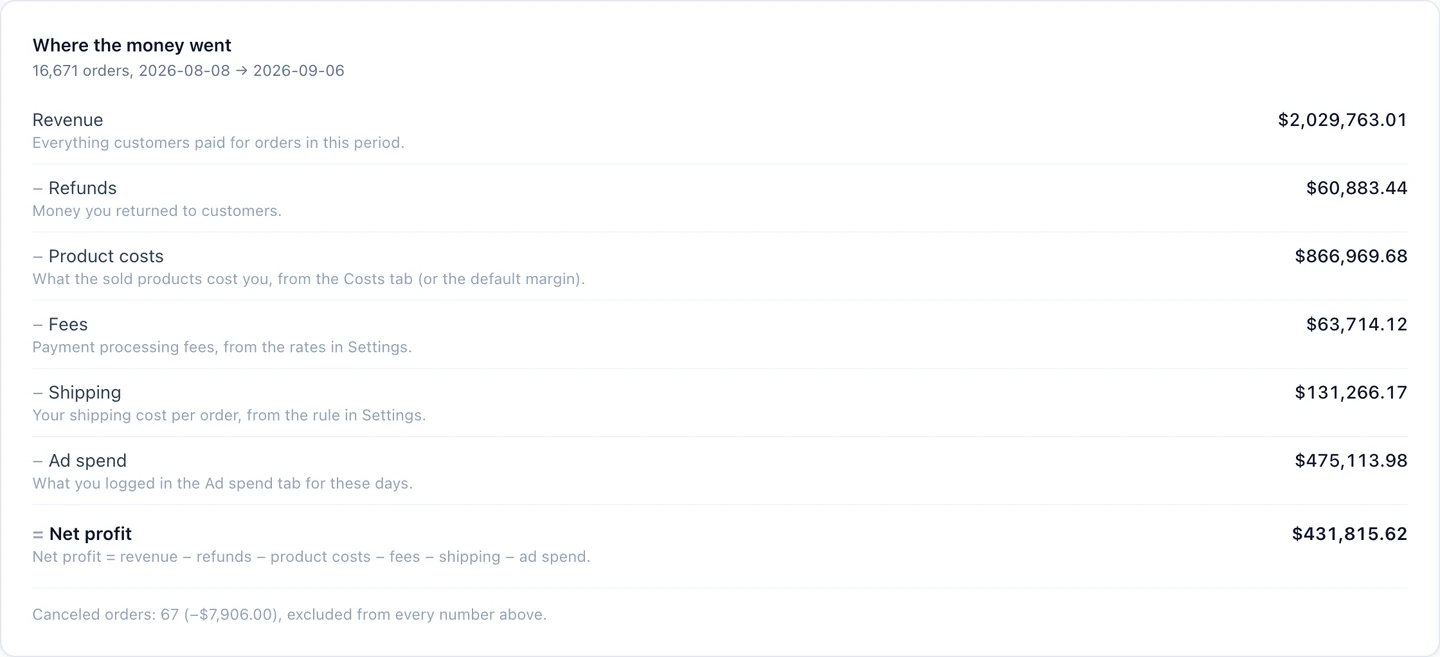
See the calculation behind net profit
WeProfit calculates net profit as revenue minus refunds, product costs, payment fees, shipping, and ad spend. Each input changes how useful the final number is.
A campaign can generate strong revenue while selling products with thin margins or high fulfillment costs. Looking at those costs next to the tracked orders gives you a more useful basis for reviewing the campaign.
Distinguish entered costs from estimates
Product costs can come from order line items, product or variant records, or a default percentage estimate. WeProfit labels product-cost coverage as exact, partial, or estimate.
Payment fees and shipping use the settings you configure. Review those assumptions and the products without recorded costs before interpreting a precise-looking profit number. The report only includes the costs supplied to its calculation.
| Coverage | How to interpret it |
|---|---|
| Exact | Recorded costs cover the relevant products; review fees, shipping and spend separately. |
| Partial | Some product costs are recorded and some are estimated. Review uncovered items. |
| Estimate | Product cost relies on the configured estimate. The calculated amount is not a supplier invoice. |
Read ROAS and POAS with the right formula
ROAS compares revenue with ad spend. WeProfit POAS compares profit before advertising costs with ad spend. Net profit subtracts ad spend afterward.
With that POAS definition, 1.0x covers advertising after the other included costs. It does not account for expenses that were never included, such as separate business overhead. Use the ratio alongside net profit, order volume, and cost coverage.
Build a useful review routine
Start with working conversion tracking, then complete the cost picture. Profit reporting becomes more useful as you improve the inputs.
- Review product and variant costs, especially new products.
- Check refund activity and shipping or payment-fee assumptions.
- Connect the supported ad accounts for automated spend synchronization.
- Compare campaigns only when dates, currencies, and attribution definitions align.
- Investigate differences in product mix before deciding what to scale.
A complete calculation with the included costs
Illustrative calculation, not a customer result. All values below use the same currency and reporting period. Costs such as rent, salaries, software subscriptions, income taxes and other overhead are not included unless supplied to an applicable cost input; the example is not whole-business accounting.
| Input or result | Amount |
|---|---|
| Revenue | $5,000 |
| Refunds | −$250 |
| Product costs | −$2,000 |
| Payment fees | −$200 |
| Shipping | −$350 |
| Profit before ad spend | $2,200 |
| Ad spend | −$1,000 |
| Net profit after included costs | $1,200 |
| ROAS | $5,000 / $1,000 = 5.0x |
| POAS | $2,200 / $1,000 = 2.2x |